

Minimalist Desk Setup ↓
Minimalist Desk Setup Guide
1. Define Your Purpose
Ask: What will I use this desk for?
• Work (e.g., laptop-based)
• Creative tasks (e.g., writing, drawing)
• Gaming or entertainment
• This determines what stays and what goes.
2. Clear Everything Off
Start from zero:
• Remove all items from the desk.
• Clean the surface and surrounding area.
3. Prioritize Essentials
Keep only what you use daily.
Typical essentials:
• Laptop or desktop monitor
• Keyboard & mouse
• Desk lamp
• Notepad & pen (or tablet/stylus)
• Water bottle or coffee mug
4. Choose the Right Desk
Minimalist desks should be:
• Simple in design
• Neutral in color (white, black, wood tones)
• Free of bulky drawers unless needed
5. Optimize Monitor Placement
• Centered directly in front of you
• Eye level to reduce neck strain
• Use a monitor arm or riser if needed
6. Cable Management
Keep cables invisible:
• Use cable sleeves, clips, or a cable box
• Route wires behind the desk
• Consider a wireless keyboard/mouse
7. Smart Storage
Use minimal, hidden storage:
• A drawer with dividers for stationery
• A single organizer tray for daily tools
• Vertical storage (shelves) if space is limited
8. Add One Personal Touch
Keep it clean but not sterile:
• A small plant
• A framed photo
• A single piece of artwork or quote
9. Keep It Digital
Minimize paper clutter:
• Use digital task lists (Notion, Todoist)
• Scan documents instead of keeping physical copies
10. Daily Reset Habit
End your day by:
• Putting items back in place
• Clearing the surface
• Recharging devices for tomorrow
*Bonus Tip
• Lighting: Use warm, diffused light; avoid harsh overhead lights.
• Ergonomics: Invest in a quality chair or a laptop stand for comfort.
• Colors: Stick to 2-3 calming, neutral tones for visual simplicity.
Follow @CaimarSalizi ↑
Subscribe: https://www.youtube.com/@CaimarSalizi
Hybrid Desk Setup ↓
Hybrid Desk Setup Guide
1. Desk & Layout
Ergonomic Furniture Adjustable Desk:
• Consider a sit-stand desk or converter.
• Chair: Ergonomic with lumbar support, adjustable height, and armrests.
Layout Tips
• Place monitor at eye level (top of screen = eye level).
• Keyboard & mouse at elbow height (90° angle).
• Distance: Monitor ~20–30 inches from eyes.
2. Tech Essentials
Core Hardware:
• Laptop (preferably with docking station for easy plug/unplug).
• Monitor: At least one external monitor; two for multitasking.
• Keyboard & Mouse: Wireless or compact wired for flexibility.
Cables & Hubs
• USB-C hub or docking station (HDMI, USB, Ethernet, etc.).
• Cable management: Velcro ties, cable trays, or under-desk organizers.
3. Audio & Video Setup
Communication Gear
• Webcam: External (1080p or better) for professional video quality.
• Microphone: USB mic or quality headset with built-in mic.
• Headphones: Noise-cancelling recommended.
4. Connectivity
Wi-Fi: Mesh network or Ethernet connection for stability.
VPN: For secure access to office resources.
Power Backup: Surge protector or small UPS in case of outages.
5. Comfort & Productivity Boosters
Lighting
• Natural light or a desk lamp with adjustable brightness.
* Ring light if you’re often on video calls.
Ambience
• Add plants, art, or calming decor to personalize space.
• Use blue light filters or glasses to reduce eye strain.
6. Portability & Flexibility
Go Bag:
• With essentials like a charger, mouse, and notebook.
• Use a portable monitor if you often switch locations.
• Cloud storage (OneDrive, Google Drive) to keep work accessible anywhere.
Follow @joshfenn ↑
Subscribe: https://www.youtube.com/@joshfenn
Gaming Desk Setup ↓
Gaming Desk Setup Guide
1. Choose the Right Desk
Size & Space:
• Make sure it's wide enough for your monitor(s), keyboard, mouse, and other accessories. Minimum width: 47” recommended.
2. Monitor Setup
Resolution:
• 1080p for budget, 1440p for balance, 4K for visual clarity (especially for next-gen console or high-end PC).
• Refresh Rate: 144Hz or higher for competitive gaming.
• Mounting: Consider a monitor arm to free up desk space and allow height/tilt adjustment.
*Tip: Eye level should be about 2–3 inches below the top of the monitor screen.
3. Keyboard & Mouse
Keyboard:
• Mechanical for tactile or linear feedback popular for gaming).
• 75% or 60% layout for space-saving.
Mouse:
• Lightweight with high DPI sensor.
• Wired for latency-sensitive games, or high-end wireless with low input delay.
Mousepad:
• Use an extended mousepad for full range of motion and added aesthetics.
4. Chair for Comfort
Ergonomics are key:
• Ergonomic Chairs - Prioritize lumbar support, headrest, and adjustable armrests.
• Sit with your knees at 90°, feet flat, and elbows at desk level.
5. Headset or Speakers
Headset:
• Look for 7.1 surround or spatial audio for immersion.
• Detachable mic or standalone mic if streaming.
Speakers:
• Soundbars or compact 2.1 speaker setups if you’re not using headphones.
6. Lighting Setup
• RGB Strip Lights behind the desk/monitor for ambient backlighting.
• Smart Bulbs (Philips Hue, Govee) for room lighting synced with games/music.
• Desk Lamp with adjustable brightness for practical use.
*Bonus: Bias lighting behind monitors reduces eye strain.
7. Cable Management
Use:
• Velcro ties
• Under-desk trays
• Cable sleeves
• Wall raceways
• Route everything to a power strip with surge protection.
*Tip: Label your cables for easy maintenance.
8. PC or Console Placement
Place your PC:
• Off the floor to avoid dust.
• With plenty of airflow (don't block side fans or intake).
• Console stands or racks help keep your area organized.
• Consider a display shelf for showcasing consoles or collectibles.
9. Decor & Personality
Wall art:
• e.g., game posters, acoustic panels.
• Collectibles, figurines, LED signs.
• Plants or faux greenery for a clean aesthetic.
• Keep the space yours—functional and personal.
*Bonus Tips
Streamers:
• Consider adding a ring light, camera mount, and dual-PC setup.
• Dual Purpose: Want a hybrid work/gaming desk? Use a drawer unit for organization and separate mouse/keyboard profiles.
• Cleanliness: Dust weekly, clean your mousepad, and vacuum behind the desk.
Follow @archetype_origins ↑
Subscribe: https://www.youtube.com/@archetype_origins
Tech-Focused Desk Setup ↓
Tech-Focused Desk Setup Guide
1. Monitor Setup
Mounting:
• VESA mounts or an adjustable arm (Ergotron, Vivo) to save desk space and improve ergonomics.
2. Keyboard + Mouse
Keyboards:
Mechanical (custom or prebuilt): Tactile or linear builds
Ergonomic Mouse: Precision: Logitech MX Master 3S or Logitech Lift
Mousepad: XL extended pad with wireless charging
3. Computing Core
Laptop or Desktop:
Laptop: MacBook Pro M3/M4 or high-end Windows ultrabook (ThinkPad, XPS)
Desktop: Custom PC or Mac Studio with good airflow and silent cooling
Docking Station: Use a Thunderbolt 4 dock (CalDigit TS4, Anker 777) to connect peripherals efficiently.
4. Audio Setup
Headphones: Sony WH-1000XM5, Sennheiser HD 6XX (with DAC), or Apple AirPods Max
Speakers: Audioengine A2+, Presonus Eris, or iLoud Micro Monitors
Mic: (if streaming/calling): Elgato Wave:3, Blue Yeti X, or Shure MV7
5. Camera + Lighting
Webcam: Elgato Facecam, Logitech Brio 4K, or DSLR/Mirrorless + capture card
Lighting: Key light with adjustable color temp (Elgato Key Light, Govee, or Neewer LED)
6. Cable Management
• Under-desk trays or raceways
• Velcro cable ties and magnetic clips
• USB-C multi-port hubs for decluttering
7. Smart + Power Setup
Smart Plugs/Lights: Compatible with HomeKit, Alexa, or Google Assistant
Surge Protector/UPS: APC Back-UPS or Anker PowerStrip with USB-C
Wireless Chargers: MagSafe for Apple users, or Qi pads for Android
8. Ergonomics
Chair: Herman Miller Aeron, Steelcase Gesture, or Secretlab Titan Evo
Desk: Adjustable sit-stand desk (Uplift, Desky, and FlexiSpot)
* Footrest & Monitor Riser if needed
9. Personal Touches
Ambient lighting: Nanoleaf panels, Govee Light Bars, or RGB LED strips
Plants: (real or fake) for greenery
Art/Posters: Related to tech, gaming, or your interests
Follow @WorkfromHype ↑
Subscribe: https://www.youtube.com/@WorkFromHype
Nature-Inspired Desk Setup ↓
Nature-Inspired Desk Setup Guide
1. Choose a Natural Color Palette
Stick to colors found in nature:
• Earth tones: soft browns, beiges, moss green, terracotta
• Cool tones: sky blue, sage, seafoam, stone gray
• Accents: warm whites, wood tones, forest green
2. Use Natural Materials
Incorporate organic, tactile elements:
Desk: Wood or bamboo (unfinished or lightly stained is ideal)
Accessories: Cork mousepad, rattan organizers, linen desk mat
Monitor stand or shelf: Wood slab or reclaimed wood
3. Add Plants
Plants purify air and bring life to the space:
• Low-maintenance options: Snake plant, pothos, ZZ plant, peace lily
• Desktop-sized plants: Mini succulents, bonsai, air plants
• Use ceramic or clay pots for a rustic look
4. Optimize Natural Lighting
Position your desk near a window if possible
• Use light-filtering curtains or blinds to soften harsh light
• Supplement with a warm-tone LED desk lamp (wood base recommended)
5. Incorporate Natural Scents
Use essential oils or candles to create a calming aroma:
• Scents to try: Cedarwood, eucalyptus, sandalwood, lavender
• Diffusers with wooden tops blend seamlessly into a natural theme
6. Inspire with Nature Artwork
• Hang botanical prints, nature photography, or abstract pieces inspired by water, mountains, or forests
• Keep frames minimal (e.g., oak, walnut, black metal)
7. Declutter with Natural Storage
• Use wicker baskets, jute bins, or wooden drawers
• Keep visible items minimal to evoke simplicity
8. Nature-Inspired Tech Accessories
• Wooden keyboard/mouse or mousepad
• Eco-friendly phone/charging dock (wood or recycled plastic)
• Neutral-toned cable organizers
9. Ambient Sounds
• Use a white noise machine or nature sound playlist:
• Rainfall, forest sounds, ocean waves, birdsong
10. Personal Touches
• A nature journal, pebble collection, pressed flowers, or dried herbs
• A calming object like a piece of driftwood, a smooth stone, or a feather
*Bonus tip
Daily Nature Rituals at Your Desk
5-minute grounding session with nature sounds and breathwork
Midday light break: open a window or take a walk outside
• Keep a small gratitude rock or plant to touch while reflecting
• Would you like a visual mood board or a product list to go along with this?
Follow @MatthewEncina ↑
Subscribe: https://www.youtube.com/@MatthewEncina
"We hope our desk setup helpful hints and pointers brings value and comfort to our cherished customers."
Proper Desk Ergonomics
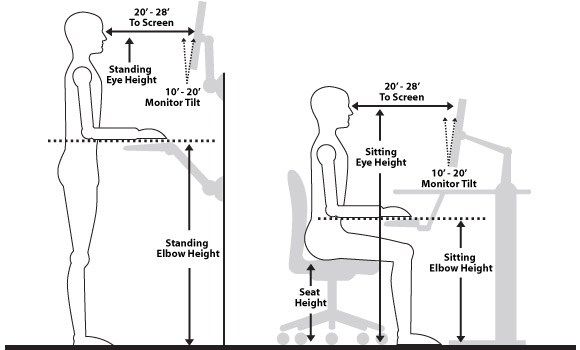
Chair Setup
• Height: Adjust so your feet are flat on the floor, knees at a 90° angle, and thighs parallel to the floor.
• Backrest: Supports the natural curve of your lower back. Use lumbar support if needed.
• Armrests: Elbows should rest comfortably at 90°, with shoulders relaxed. Armrests should not interfere with typing.
Monitor Placement
• Height: Top of the screen at or just below eye level.
• Distance: About an arm's length (20–28 inches) from your eyes.
• Angle: Tilt the monitor slightly upward (10–20°) and position to avoid glare.
• Dual Monitors: Place the primary screen directly in front; secondary at a slight angle.
Keyboard & Mouse
• Position: Directly in front of you, at elbow height.
• Angle: Keep wrists straight; avoid upward tilt. Consider a slight negative tilt (downward).
• Mouse: Close to keyboard and at the same height. Use a wrist rest or mouse pad if needed.
• Typing posture: Elbows close to your body, wrists hovering naturally above the keys.
Feet Position
• Flat feet on the ground or use a footrest if needed.
• Avoid crossing legs or tucking them under you for long periods.
Posture Tips
• Sit upright, not slouched.
• Ears aligned over shoulders.
• Change positions often; micro-movements help circulation.
• Stand up, stretch, or walk every 30–60 minutes.
Optional Ergonomic Tools
• Adjustable sit-stand desk
• Monitor risers or arms
• Ergonomic keyboard/mouse
• Anti-fatigue mat (for standing)
Speaker Placement Basics
• Don’t place speakers flat on the desk – it causes sound reflections and muddiness.
• Use isolation pads or speaker stands to:
1. Reduce vibration transfer to the desk
2. Slightly tilt the speakers toward your ears if needed


